
Chlorinator Troubleshooting Guide
Practical checks to help keep your AquaSolis chlorinator running reliably.
Your pool chlorinator works quietly in the background, producing chlorine from salt or mineral water so your pool stays clear, comfortable, and ready to use. When something changes — a warning light, low output, poor flow, or cloudy water — the cause is not always a failed part.
In many cases, chlorinator issues are linked to water balance, salt level, circulation, operating settings, or cell condition. This guide helps you check the most common causes before replacing parts or arranging service.
Use this as a general troubleshooting guide for AquaSolis salt and mineral chlorinators. For exact button sequences, timer settings, warnings, and safety instructions, always refer to your product manual.
How an AquaSolis Salt Chlorinator Works
A salt and mineral chlorinator converts dissolved salt, or a compatible mineral blend, into chlorine using an electrolytic cell. Pool water passes through the cell, a low-voltage current is applied to the titanium plates, and chlorine is produced to help sanitise the pool.
For the system to operate correctly:
- Water must be circulating through the cell housing
- Salt or mineral levels must be within the correct range for your model
- The cell must be clean, connected, and in good condition
- The chlorinator must run long enough to meet the pool’s chlorine demand
- Water chemistry must stay balanced so chlorine can work efficiently
Most chlorinator systems include three main parts:
- Power pack / controller – controls output, timing, power supply, and safety protections
- Salt cell / electrode – produces chlorine from the salt or mineral water
- Cell lead, sensors, and connections – help monitor flow, salt conditions, cell direction, and safe operation
If the system detects low flow, low salt, high salt, overheating, or another operating issue, it may reduce or stop chlorine production to protect the cell and power pack.
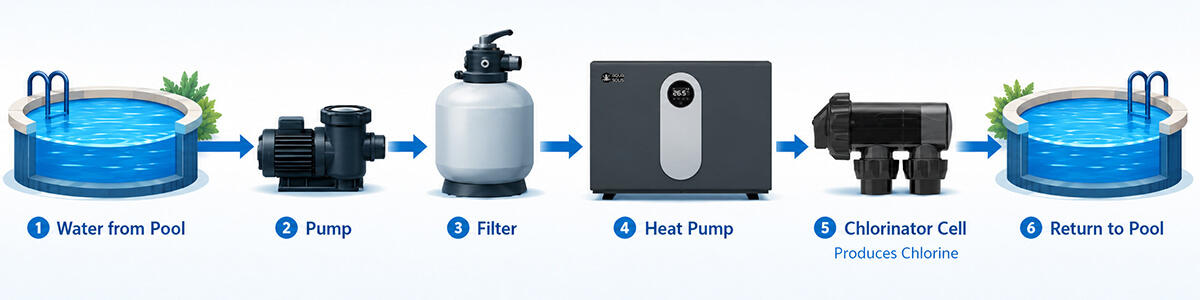
Start Here: Quick Checks Before Replacing Parts
Before assuming the chlorinator or cell has failed, work through these simple checks. They cover the most common causes of low output and warning lights.
1. Check pump operation and flow
Confirm the pump is running, primed, and returning steady water to the pool. Poor flow can stop chlorine production.
2. Clean baskets and filter
Empty the skimmer and pump baskets. Backwash or clean the filter if flow appears weak or the cell housing has air pockets.
3. Check chlorinator mode and output
Confirm the timer is in the correct mode, the cell switch is on, and the output level is suitable for the season and pool use.
4. Test water balance
Check free chlorine, pH, and salt level. Use an independent water test rather than relying only on the chlorinator display.
5. Inspect the salt cell
Look for white calcium scale, debris, worn plates, or loose cell connections. Clean the cell only when scale is visible.
6. Review run time
In hot weather, heavy use, or after rain, the pool may need longer filtration and chlorination time to maintain chlorine.
Helpful reminder: A chlorinator produces chlorine, but it does not automatically balance pool water. Correct pH, alkalinity, stabiliser, calcium hardness, salt level, and run time all affect performance.
Troubleshooting by Warning Light or Symptom
Use the sections below based on what your AquaSolis chlorinator is showing or how the pool is behaving. Some symptoms can have more than one cause, so start with water flow, salt level, and cell condition before replacing parts.
No Power / No Lights
What may be happening: The power pack is not receiving power or there may be an electrical supply issue.
What to check:
- Confirm the power cord is plugged into a suitable weatherproof RCD-protected outlet
- Check the wall outlet is switched on
- Test the outlet with another working appliance if safe to do so
- Check that the power pack has not been exposed to water entry or visible damage
Pause troubleshooting and arrange professional assessment if the safety switch trips repeatedly, the power cord is damaged, there is a burning smell, or water has entered the power pack.
Warning LED Solid Green
What it means: No fault is detected and the chlorinator should be operating normally.
If chlorine is still low while the warning light is green, check:
- Output setting and daily run time
- pH level and stabiliser level
- Salt level
- Cell cleanliness and condition
- Whether the pool has had heavy use, hot weather, or rain
Warning LED Solid Orange - Low Salt
What may be happening: The system is detecting low salt, low conductivity, poor connection, scale build-up, or a cell nearing the end of its life.
What to check:
- Have the pool water tested for salt level
- Confirm the correct salt range for your model
- Inspect the cell for calcium build-up
- Check water flow through the cell
- Check the cell cable plug is firmly connected to the cell cap
AquaSolis CLS+ standard models: 3000–4000 ppm, with 3500 ppm ideal.
AquaSolis CLS+ Low Salt models: 1200–1800 ppm, with 1500 ppm ideal.
Warning LED Blinking Orange - High Salt
What may be happening: Salt level is too high, which can increase heat and electrical load.
What to check:
- Test salt level independently
- Do not add more salt until the water is tested
- If salt is above range, reduce output as directed in the manual or dilute the water by partially draining and refilling
- Allow the system to circulate before retesting
Keeping salt within range helps protect the power pack and maintain efficient chlorine production.
Warning LED Solid Red - Internal Temperature Trip
What may be happening: The power pack has detected excessive internal temperature.
What to check:
- Check that salt level is not too high
- Confirm the power pack is well ventilated
- Make sure it is not covered by towels, covers, or other items
- Keep the power pack away from chemical fumes and enclosed corrosive spaces
The fault should reset once the transformer cools down. If the warning continues, arrange professional assessment.
Warning LED Blinking Red - Water Flow Fault
What may be happening: The chlorinator has detected low or no water flow and has paused chlorine production to protect the cell.
What to check:
- Confirm the pump is running and primed
- Remove air locks from the system
- Clean skimmer and pump baskets
- Backwash or clean the filter
- Check valves are open and correctly positioned
- Confirm the cell housing is full of water, not air
- Check the cell plug and contacts are secure
Once flow is restored, the indicator may take a few minutes to reset. Pressing the increase or decrease button may prompt the unit to try starting again.
Power and Direction Lights On, but No Output Lights
What may be happening: The cell is not connected, output is set too low, salt level is low, the cell is scaled, or the cell is worn.
What to check:
- Ensure the cell plug is securely fitted into the cell cap
- Increase output using the + button
- Test salt level
- Inspect and clean the cell if calcium scale is visible
- Check whether the cell is at the end of its working life
If the cell is clean, salt level is correct, and output still does not return, the cell or power pack may need professional assessment.
Low Chlorine Output
What may be happening: The pool’s chlorine demand is higher than the system is currently producing, or the cell is not producing at full efficiency.
What to check:
- Increase output or run time
- Check salt level
- Inspect the cell for calcium build-up
- Check that the filter is clean and flow is strong
- Check pH and stabiliser level
- Consider recent weather, rain, heavy use, or high bather load
Cold water can also reduce output. As a guide, for each 1°C below 28°C, output may drop by around 2–3%.
Pool Has Little or No Chlorine
What may be happening: The chlorinator may be operating, but the pool is using chlorine faster than it is being produced.
What to check:
- Confirm the unit is actually producing chlorine
- Review output settings and daily run time
- Test and correct pH
- Check stabiliser level
- Check salt level
- Clean the filter and inspect the cell
- Use BOOST mode for short-term recovery after heavy use
If the pool frequently struggles to maintain chlorine, the system may need longer run time, better water balance, or a correctly sized replacement cell.
Cell Not Cleaning / Excessive Calcium Build-Up
What may be happening: High calcium hardness, high pH, unbalanced water, or an unsuitable polarity change setting may be causing scale to remain on the plates.
What to check:
- Test calcium hardness, pH, and total alkalinity
- Clean the cell according to the manual if scale is visible
- Confirm the unit is changing direction
- Review polarity reversing time if water hardness is high
Only reduce polarity change time if needed. Faster polarity changes can increase wear on the cell coating over time.
Cell Works in One Direction Only
What may be happening: The cell may be dirty, worn in one direction, or the power pack may not be reversing polarity correctly.
What to check:
- Try a temporary polarity change using the cell switch procedure in the manual
- Inspect and clean the cell if needed
- Check whether output is low in one direction but normal in the other
If the unit continues to operate in only one direction, arrange professional assessment.
Pump Outlet Not Working or Pump Always On
What may be happening: The pump may not be plugged into the chlorinator power pack, or timer settings may need checking.
What to check:
- Confirm the pump is plugged into the pump outlet at the bottom of the power pack
- Check timer mode is set correctly
- Review ON, OFF, AUTO, and BOOST settings
- Confirm the pump rating does not exceed the permitted power pack rating
If the pump is not controlled by the power pack, a suitable flow-safety control must be used so the cell is not energised without water flow.
Using BOOST Mode
BOOST mode temporarily increases chlorination when the pool needs extra recovery support. It can be useful after heavy swimming, hot weather, rain, or a higher-than-usual bather load.
BOOST is not a substitute for regular water testing or balanced water chemistry. If you frequently need BOOST mode to maintain chlorine, check salt level, pH, stabiliser, cell condition, and daily run time.
Recommended Water Balance
Correct water balance helps your chlorinator work efficiently and protects the salt cell from unnecessary scale, heat, and coating wear.
| Parameter | Recommended Range | Testing Frequency |
|---|---|---|
| Free Chlorine | 1–3 ppm Maximum 4 ppm |
Weekly |
| pH - Concrete Pools | 7.4–7.6 | Weekly |
| pH - Fibreglass / Vinyl Pools | 7.2–7.4 | Weekly |
| Total Alkalinity - Concrete Pools | 80–150 ppm | Every 4–6 weeks |
| Total Alkalinity - Fibreglass / Vinyl Pools | 80–120 ppm | Every 4–6 weeks |
| Calcium Hardness - Concrete Pools | 250–300 ppm | Every 3 months |
| Calcium Hardness - Fibreglass / Vinyl Pools | 150–190 ppm | Every 3 months |
| Stabiliser / Cyanuric Acid | 30–60 ppm | Every 4–6 weeks |
| Salt Level - AquaSolis CLS+ Standard Models | 3000–4000 ppm 3500 ppm ideal |
Every 4–6 weeks |
| Salt Level - AquaSolis CLS+ Low Salt Models | 1200–1800 ppm 1500 ppm ideal |
Every 4–6 weeks |
Salt reminder: Add salt to the shallow end and brush to dissolve. Never add salt directly into the skimmer box. For mineral salts, allow around 20–30% more product to reach the correct operating level.
Simple Maintenance Schedule
A steady routine helps prevent most chlorinator issues and supports longer cell life.
- Weekly: Test free chlorine and pH
- Every 4–6 weeks: Test salt level, stabiliser, and total alkalinity
- Every 2–3 months: Inspect the cell for calcium scale or debris
- Every 3 months: Check calcium hardness
- Seasonally: Adjust output and run time for summer or winter demand
- Yearly: Check that cell plug connections are clean, firm, and in good condition
Safety & Service Boundaries
Some checks are suitable for pool owners, such as testing water, checking flow, inspecting the cell, and reviewing basic operating settings. Other issues should be handled by a qualified specialist to protect the equipment and keep the system operating safely.
Pause troubleshooting and arrange professional assessment if:
- Power issues persist or safety devices trip repeatedly
- The power cord, cable, plug, or terminals appear damaged
- There is a burning smell, heat damage, or signs of water entry into the power pack
- The cell is cracked, leaking, or physically damaged
- The pump outlet is not operating correctly
- The system continues to show faults after water balance, flow, and cell condition have been checked
- Internal power pack work, hardwiring, timer battery replacement, or electrical diagnosis is required
Safety note: Installation and servicing should be completed safely and in line with the product manual. Any electrical work, damaged wiring, internal power pack servicing, or hardwired installation must be completed by a licensed electrician or approved specialist.
This guide provides general troubleshooting for AquaSolis salt and mineral chlorinators. Always follow your specific model’s manual for exact operating instructions, reset steps, warnings, and safety requirements.